 Template to Launch
Part 10 of 11
Page titles, descriptions and search settings
Where a hosted website builder keeps the page title, the page description and the search engine settings, and how to fill them in.
Last reviewed
In a nutshell
- Every page has a title and a short description that search engines can show.
- Your builder has boxes for them. Where they sit depends on the builder.
- Fill them in for the pages that matter most. Start with the home page.
What these settings are
When your site shows up in a search, the result has two parts you can shape.
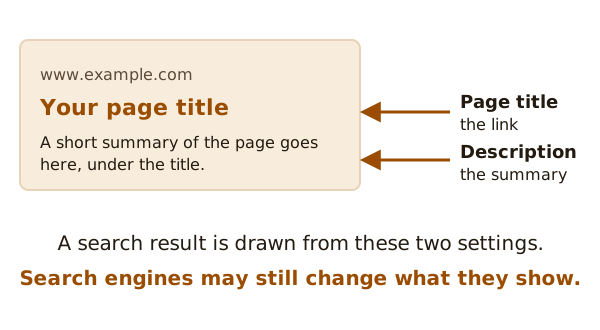
The first is the page title. Google calls it a title link: the title of a search result that links to the web page.[1] The second is the page description. It is also called a meta description. It's a short summary that appears in search results.[2]
Together, these settings are part of what people call SEO. That stands for search engine optimization. It just means helping search engines understand your pages.
Where to find them
Builders hide these settings in different places. Names change too. One builder says "SEO settings". Another says "Page info" or "Search appearance".
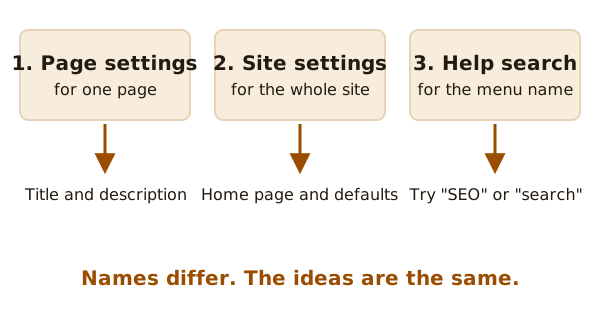
Here's how to hunt for them:
- Open the settings for a single page. Look for a tab or a menu item about search, SEO or page info. This is where the title and description usually live.
- Open the settings for the whole site. You'll often find the home page title and a default pattern here.
- Still lost? Use the builder's help search. Type "SEO" or "search description".
Why do you need to look? Because many builders don't let you edit the page code. Google points out that you might not be able to edit your HTML directly, or you might prefer not to.[3] So the builder gives you boxes instead.
Writing a good title
Keep it plain. Say what the page is about.
Google asks that every page on your site has a title.[1] It also says to avoid vague descriptors.[1] "Home" tells nobody anything. "Garden design in Leeds" tells them a lot.
Give each page its own title. Two pages with the same title confuse readers.
Writing a good description
Think of it as one or two plain sentences. Say what a person will find on the page.[2]
Don't stuff it with lists of words. Don't copy the title.
One thing to know: you don't have the final say. Google sometimes uses the description you wrote, if it gives a more accurate picture of the page than the page text.[3] Other times, it picks its own words. So write a good one, but don't worry if the result looks different.
A simple plan
- Start with the home page. Then do your top three or four pages.
- Write the title first. Then the description.
- Save, then publish. The saving and publishing page explains why changes don't show until you publish.
- Come back later and do the rest, a few at a time.
New pages take a while to appear in search anyway. The pre-publish checklist covers that wait, along with the choice to hide a site from search at first.
Sources
- Influencing your title links in search results, Google Search Central (accessed 2026-11-02)
- WordPress SEO, WordPress.com Support (accessed 2026-11-02)
- How to write meta descriptions, Google Search Central (accessed 2026-11-02)